Air Video Server 2.4.2

Air Video can stream videos in almost any format to your iPhone, iPad and iPod touch. You don't need to copy your videos to the device just to watch them. 

 
If the videos in your collection are not in format supported by iPhone, Air Video can convert them on fly (live conversion) or offline (entire file).
Streaming
  • Automated server discovery on local network using Apple Bonjour
  • Possibility to add custom servers by specifying IP address and port directly Can be used to stream videos over internet (see the appropriate section in FAQ)
  • Share disk folders and iTunes playlists
  • Optional password protection
  • Add videos to iTunes playlist from iPhone
Conversion
  • Videos that can not by directly played by iPhone can be easily converted. All major containers and codecs supported (mp4, m4v, mov, avi, wmv, asf, mpg, mpeg, mkv, 3gp, dmf, divx, flv). DRM protected videos as well as proprietary codecs are NOT supported.
  • Live conversion allows you to play videos without having to convert them upfront. Requires iPhone or iPod touch with firmware 3.0 or newer and sufficiently powerful computer.
  • Option to convert entire video before playing it (offline conversion)
  • Files converted offline can be put to conversion queue
  • Adjust quality, zoom and resolution for each video individually
  • Select audio stream (language)

COMODO Internet Security Premium 5.0.162636.1135

Comodo Internet Security is the free, multi-layered security application that keeps hackers out and personal information in.
Built from the ground upwards with your security in mind, Internet Security offers 360° protection by combining powerful Antivirus protection, an enterprise class packet filtering firewall, advanced host intrusion prevention and automatic sandboxing of unknown files.

 Complete protection against viruses and Internet attacks for Windows computers. Comodo Internet Security was developed to be a free, multi-layered security application that keeps hackers out and personal information in.
Built from the ground upwards with your security in mind, Internet Security offers 360° protection by combining powerful Antivirus protection, an enterprise class packet filtering firewall, and an advanced host intrusion prevention system called Defense+.
Unlike the stripped down versions of commercial software that other software vendors offer for free, this is the full, completely functional version of the product.
Here are some key features of "COMODO Internet Security Premium":

Default Deny Protection(DDP):

· Only known and listed PC-safe files and applications are able to access your PC.

Prevention-based protection:

· Firewall and Antivirus combine to stop viruses and malware before they enter the PC.

Sandbox technology:

· The sandbox is a virtual operating environment for untrusted programs – ensuring viruses and other malicious software are completely isolated from the rest of your computer.

Personalized protection alerts:

· Firewall quickly learns the rules you set for downloading software, and adjusts its alerts accordingly to fit your needs.

Real-time access to updated virus definitions:

· Automatic updates mean greatest possible protection possible against zero-day threats.

One-click virus scanning:

· Make sure your PC is clean with one simple button click.

Uncluttered, user-friendly interface:

· Quickly navigate through the various parts of Firewall protection without getting lost.

Thorough security "wizards":

· Preset security settings for simple point-and-click setup.

Unique "slider" to easily change your current security level:

· Easily switch between presets to reflect your security preference at any given time.

Exclusive access to Comodo's "safe-list":

· List of over two million known PC-friendly files and applications so safe files and apps are allowed to run.


Download 32bit

Download 64bit

Chrome Password Decryptor 2.0

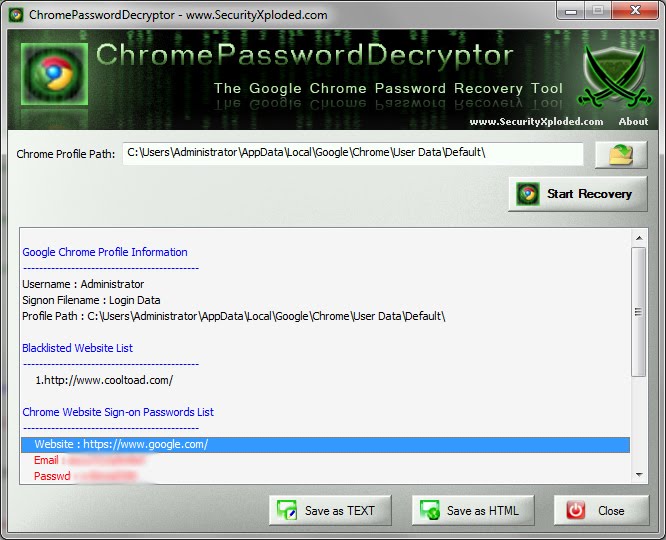
ChromePasswordDecryptor tool makes it easy to decrypt or recover the login secrets stored by Chrome. It automatically detect the default chrome profile path for the current user and displays all the stored login credentials in clear text after decrypting them. It also shows all the blacklisted website entries for which user has prompted Chrome to not to remember the passwords.


Another useful feature of this tool is the Export option which can be used to save the login secrets to the local file in standard HTML format. This will be very useful in following cases
  • To take backup of the login secrets for the stored websites
  • To transfer the secrets from one system to another.
  • To store the website passwords at more secured centralized location
  • To recover the passwords in case Chrome becomes not accessible or non functional.
New version 2.0 supports password recovery from latest Google Chrome version. Along with it also comes with cool interface, better icons and a good display of report.

ChromePasswordDecryptor is a standalone portable tool which does not require any installation and can be run from anywhere. It works on wide range of platforms starting from Windows XP to latest operating system, Windows 7.

Chrome stores all the sign-on secrets into the internal database file called 'Web data' in the current user profile folder. Newer version has moved the login passwords related database into new file named 'Login Data'.  The current version 2.0 automatically detects new version and recovers the passwords accordingly from right password database file.

This database file is in SQLite format and contains number of tables storing different kind of data such as auto complete, search keyword, ie7logins etc in addition to login secrets.

The logins table mainly contains the information about sign-on secrets such as website URL, username, password fields etc. All this information is stored in the clear text except passwords which are in encrypted format. 

ChromePasswordDecryptor loads the secrets from logins table and then decrypts the password for each of the websites stored by Chrome.


Download

KMPlayer 2.9.4.1438

KMPLAYER is a Korean movie and audio player that supports a wide range of codecs and file formats, It has full VCD/DVD playback functionality.
Choosing a multimedia player used to be a real no-brainer. However, during recent times the raft of new features and updates added to classic media players like Winamp, Windows Media Player, and even iTunes have left the apps increasingly bloated. For those looking for a fresh alternative to these ballooning apps, KMPlayer could be your ticket.


KMPlayer has a small desktop footprint and its minimalist interface makes video playback quick and hassle-free. The player's interface is fully skinable, and there are some nice aesthetic touches, such as the changing of colour on the player with every new track.
There are all sorts of options to help you pimp and customize KMPlayer, such as visualizations, plug-ins and playback options. But the beauty of KMPlayer is that these are turned on at your request rather than being forced upon you at the outset.
KMPlayer handles both audio and video, and supports a wide range of different formats, meaning that once installed, you should never need to touch another player. Video playback is particularly impressive thanks to the range of processing tools available that allow you to sharpen, change picture properties, apply filters and even make video captures from within the program.

KMPlayer 1435 official version updated details

Supported Files or Devices:
· HTTP Streaming(AVI etc including none-streaming media)
· Directshow playback (avi, mkv etc)
· Real Engine + Directshow (needs Real Player or Alternative)
· QuickTime Engine + Directshow (needs QuickTime player or Alternative)
· Mplayer Engine Support
· Winamp Input Plugin(decoder) Support
· Compressed Audio Album Support(zip, rar)
· Audio CD(2000, XP only / Win9x-Support by winamp plugin)
· Video CD/SVCD/XCD : CDXA Format (2000, XP only)
· DVD playback
· DTS Wave and AC3 files
· WDM device support like TV or Camera
· CD Image File (BIN/ISO/IMG/NRG) ; NRG needs mplayer.dll
· Shoutcast (Including NSV)
· AAC, OGG parser/decoder
· Shockwave Flash/FLC/FLI
· Ape/MPC/Flac/Module etc
· Various Image files like png, gif etc
· Incomplete/Damaged AVI file (Skip Damaged Frames)
· Locked Media Files while downloading or sharing

Built-in Codec/Filters:
· Video Codec
· MPEG4 (Divx/Xvid : ffmpeg/xvid)
· MPEG1/2 (ffmpeg/libmpeg)
· etc (ffmpeg)
· Audio Codec
· AC3/DTS/LPCM/MPG/MP3/OGG/AAC/WMA
· 2Ch to Multi Channel expansion
· External Codec
· Media Priority to Connect among Directshow, Real, QT, Winamp and Mplayer
· Custom Filter Manager
· System Filter Manger

Plugins:
· Winamp Input Plugins
· Winamp DSP Plugins (Can Stack)
· Winamp Visual Plugins (Can Stack)
· Winamp General Plugins (Media Library etc Support)
· KMP Video Plugins by SDK (Can Stack)
· DScaler Filter Support (Can Stack)


 Download

McAfee AVERT Stinger 10.0.1.1028

Stinger is a stand-alone utility used to detect and remove specific viruses. It is not a substitute for full anti-virus protection, but rather a tool to assist administrators and users when dealing with an infected system. Stinger utilizes next generation scan engine technology, including process scanning, digitally signed DAT files, and scan performance optimizations.


 How do I use Stinger?
  1. Download v10.1.0.1028 [MD5: 09370F8059DAA15329A75A951F4E6981, Build Nr: 10.1.0.1028] (09/09/2010)

 McAfee AVERT Stinger is not a substitute for the full anti-virus protection, but rather a tool that assists administrators and users when dealing with an infected system.

Stinger utilizes next generation scan engine technology, including process scanning, digitally signed DAT files, and scan performance optimizations.

This version of Stinger includes detection for all known variants :

■ BackDoor-ALI
■ BackDoor-AQJ
■ BackDoor-AQJ.b
■ BackDoor-CEB
■ BackDoor-CEB!bat
■ BackDoor-CEB!hosts
■ BackDoor-CEB.b
■ BackDoor-CEB.c
■ BackDoor-CEB.d
■ BackDoor-CEB.dll
■ BackDoor-CEB.dr
■ BackDoor-CEB.e
■ BackDoor-CEB.f
■ BackDoor-CEB.sys
■ BackDoor-CFB
■ BackDoor-JZ
■ BackDoor-JZ.dam
■ BackDoor-JZ.dr
■ BackDoor-JZ.gen
■ BackDoor-JZ.gen.b
■ Bat/Mumu.worm
■ Downloader-DN.a
■ Downloader-DN.b
■ Exploit-DcomRpc
■ Exploit-DcomRpc.b
■ Exploit-DcomRpc.dll
■ Exploit-Lsass
■ Exploit-Lsass.dll
■ Exploit-MS04-011
■ Exploit-MS04-011.gen
■ HideWindow
■ HideWindow.dll
■ IPCScan
■ IRC/Flood.ap
■ IRC/Flood.ap.bat
■ IRC/Flood.ap.dr
■ IRC/Flood.bi
■ IRC/Flood.bi.dr
■ IRC/Flood.cd
■ NTServiceLoader
■ ProcKill
■ PWS-Narod
■ PWS-Narod.dll
■ PWS-Narod.gen
■ PWS-Sincom
■ PWS-Sincom.dll
■ PWS-Sincom.dr
■ W32/Anig.worm
■ W32/Anig.worm.dll
■ W32/Bagle
■ W32/Bagle!eml.gen
■ W32/Bagle!pwdzip
■ W32/Bagle.ad!src
■ W32/Bagle.dldr
■ W32/Bagle.dll.dr
■ W32/Bagle.eml
■ W32/Bagle.fb!pwdzip
■ W32/Bagle.fc!pwdzip
■ W32/Bagle.fd!pwdzip
■ W32/Bagle.fe!pwdzip
■ W32/Bagle.fm.dldr
■ W32/Bagle.gen
■ W32/Bagle@MM!cpl
■ W32/Blaster.worm
■ W32/Blaster.worm.k
■ W32/Bropia.worm
■ W32/Bugbear
■ W32/Bugbear.a.dam
■ W32/Bugbear.b!data
■ W32/Bugbear.b.dam
■ W32/Bugbear.gen@MM
■ W32/Bugbear.h@MM
■ W32/Bugbear@MM
■ W32/Deborm.worm.ah
■ W32/Deborm.worm.gen
■ W32/Doomjuice.worm
■ W32/Dumaru
■ W32/Dumaru.ad@MM
■ W32/Dumaru.al.dll
■ W32/Dumaru.dll
■ W32/Dumaru.eml
■ W32/Dumaru.gen
■ W32/Dumaru.gen@MM
■ W32/Dumaru.w.gen
■ W32/Elkern.cav
■ W32/Elkern.cav.c
■ W32/Elkern.cav.c.dam
■ W32/Fizzer
■ W32/Fizzer.dll
■ W32/FunLove
■ W32/FunLove.apd
■ W32/Gaobot.worm
■ W32/Harwig.worm
■ W32/IRCbot
■ W32/IRCbot.worm
■ W32/IRCbot.worm.dll
■ W32/Klez
■ W32/Klez.dam
■ W32/Klez.eml
■ W32/Klez.gen.b@MM
■ W32/Klez.rar
■ W32/Korgo.worm
■ W32/Lirva
■ W32/Lirva.c.htm
■ W32/Lirva.eml
■ W32/Lirva.gen@MM
■ W32/Lirva.htm
■ W32/Lirva.txt
■ W32/Lovgate
■ W32/Mimail
■ W32/Mimail.c@MM
■ W32/Mimail.c@MM
■ W32/Mimail.i!data
■ W32/Mimail.q@MM
■ W32/MoFei.worm
■ W32/MoFei.worm.dr
■ W32/Mumu.b.worm
■ W32/Mydoom
■ W32/Mydoom!bat
■ W32/Mydoom!ftp
■ W32/Mydoom.b!hosts
■ W32/Mydoom.dam
■ W32/Mydoom.t.dll
■ W32/Mytob
■ W32/Mytob.gen@MM
■ W32/Mytob.worm
■ W32/MyWife
■ W32/MyWife.dll
■ W32/MyWife@MM
■ W32/Nachi!tftpd
■ W32/Nachi.worm
■ W32/Netsky
■ W32/Netsky.af@MM
■ W32/Nimda
■ W32/Nimda.dam
■ W32/Nimda.eml
■ W32/Nimda.gen@MM
■ W32/Nimda.htm
■ W32/Pate
■ W32/Pate!dam
■ W32/Pate.dam
■ W32/Pate.dr
■ W32/Polip
■ W32/Polip!mem
■ W32/Polybot
■ W32/Polybot.bat
■ W32/Sasser.worm
■ W32/Sasser.worm!ftp
■ W32/Sdbot
■ W32/Sdbot!irc
■ W32/Sdbot.bat
■ W32/Sdbot.cli
■ W32/Sdbot.dll
■ W32/Sdbot.dr
■ W32/Sdbot.worm
■ W32/Sdbot.worm!ftp
■ W32/Sdbot.worm.bat.b
■ W32/Sdbot.worm.dr
■ W32/Sdbot.worm.gen
■ W32/Sdbot.worm.gen.a
■ W32/Sdbot.worm.gen.b
■ W32/Sdbot.worm.gen.c
■ W32/Sdbot.worm.gen.d
■ W32/Sdbot.worm.gen.e
■ W32/Sdbot.worm.gen.q
■ W32/Sober
■ W32/Sober!data
■ W32/Sober.dam
■ W32/Sober.eml
■ W32/Sober.f.dam
■ W32/Sober.g.dam
■ W32/Sober.q!spam
■ W32/Sober.r.dr
■ W32/Sober.r@MM
■ W32/Sobig
■ W32/Sobig.dam
■ W32/Sobig.eml
■ W32/Sobig.f.dam
■ W32/Sobig.gen@MM
■ W32/Spybot.worm
■ W32/SQLSlammer.worm
■ W32/Swen
■ W32/Swen@MM
■ W32/Yaha.eml
■ W32/Yaha.gen@MM
■ W32/Yaha.y@MM
■ W32/Yaha@MM
■ W32/Zafi
■ W32/Zafi.b.dam
■ W32/Zindos.worm
■ W32/Zotob.worm
■ W32/Zotob.worm!hosts

Note: Windows ME and XP utilize a restore utility that backs up selected files automatically to the C:_Restore folder.

The filename has been changed from "stinger.exe" to "s-t-i-n-g-e-r.exe" to circumvent anti-stinger tactics used by Sober.p.

This means that an infected file could be stored there as a backup file, and VirusScan will be unable to delete these files. You must disable the System Restore Utility to remove the infected files from the C:_Restore folder.


Download McAfee AVERT Stinger 10.0.1.1028

Opera Mini 5.1 for Windows Mobile

Opera has just introduced the latest version of the Opera Mini for devices based on the aging Windows Mobile platform. Opera Mini 5.1 for Windows Mobile brings about only a handful of improvements but those are still enough to make it worth downloading.


Breathe new life into your old Windows Mobile device with the brand new Opera Mini 5.1! Windows Mobile 2003 SE, 5.x and 6.x handsets will now have the same fantastic browser experience as millions of Opera Mini users out there.

This updated version features better support for high-resolution devices and auto-rotation with improved accelerometer support. This is in addition to the new improved font rendering and page layout. You can even set Opera Mini as the default browser on your device.


Opera Mini 5.1 has already been released for Java, Android and BlackBerry phones. Now available for Windows Mobile 2003 SE, 5.x and 6.x handsets, Opera Mini’s server backbone speeds up browsing while reducing the data transferred to the phone. For users roaming on expensive networks, or with pay-as-you-go data plans, Opera Mini can cut your mobile data bill by up to 90 percent.

Opera Mini 5.1 features many compelling updates, including:
  • The ability to set Opera Mini as the default browser
  • Support for devices with high-resolution (high DPI)
  • Improved page layout and font rendering
  • Support for auto-rotation
  • Advanced configuration support for power users
“Opera Mini 5.1 contains several key improvements for the millions of people with a Windows Mobile phone,” said Jon von Tetzchner, Co-founder, Opera Software. “The new Opera Mini is particularly vibrant and really takes advantage of high resolution screens. And, now that you can set Opera Mini as your default browser on a Windows Mobile phone, it is much easier to enjoy the speed boost and data compression. It is our way of making your Windows Mobile phone better.”

Download

Visit m.opera.com with your phone’s default browser, and Opera will automatically select the optimized version for your phone. Opera Mini is free to download and use. Opera Mini works on Windows Mobile 2003 SE, Windows Mobile 5.x and Windows Mobile 6.x phones.

Press

Download Opera Mini 5.1 press kit ( Including: Campaign images, logos and icon ).

Source

Sysinternals Suite 1.0 Build 09.09.2010

Sysinternals Troubleshooting Utilities have been rolled up into a single Suite of tools. This file contains the individual troubleshooting tools and help files. It does not contain non-troubleshooting tools like the BSOD Screen Saver or NotMyFault.

The Suite is a bundling of the following selected Sysinternals Utilities:
Sysinternals Suite is a full package of the very useful utilities from Mark Russinovich's well known tools.The Sysinternals Troubleshooting Utilities have been rolled up into a single Suite of tools.

This file contains the individual troubleshooting tools and help files. It does not contain non-troubleshooting tools like the BSOD Screen Saver or NotMyFault.

Sysinternals tools play an important role for Microsoft support services, as evidenced by the growing collection of Microsoft Knowledge Base (KB) articles that reference them.

The Sysinternals web site was created in 1996 by Mark Russinovich and Bryce Cogswell to host their advanced system utilities and technical information.

Microsoft acquired Sysinternals in July, 2006. Whether you’re an IT Pro or a developer, you’ll find Sysinternals utilities to help you manage, troubleshoot and diagnose your Windows systems and applications.


Download


Sysinternals Utilities Index

Sysinternals Suite
The entire set of Sysinternals Utilities rolled up into a single download.
AccessChk
v5.0 (April 28, 2010)
AccessChk is a command-line tool for viewing the effective permissions on files, registry keys, services, processes, kernel objects, and more.
AccessEnum
1.32 (November 1, 2006)
This simple yet powerful security tool shows you who has what access to directories, files and Registry keys on your systems. Use it to find holes in your permissions.
AdExplorer
v1.42 (July 29, 2010)
Active Directory Explorer is an advanced Active Directory (AD) viewer and editor.

AdInsight
v1.01 (November 20, 2007)
An LDAP (Light-weight Directory Access Protocol) real-time monitoring tool aimed at troubleshooting Active Directory client applications.
AdRestore
v1.1 (November 1, 2006)
Undelete Server 2003 Active Directory objects.
Autologon
v3.0 (June 23, 2010)
Bypass password screen during logon.
Autoruns
v10.02 (July 22, 2010)
See what programs are configured to startup automatically when your system boots and you login. Autoruns also shows you the full list of Registry and file locations where applications can configure auto-start settings.
BgInfo
v4.16 (October 1, 2009)
This fully-configurable program automatically generates desktop backgrounds that include important information about the system including IP addresses, computer name, network adapters, and more.
BlueScreen
v3.2 (November 1, 2006)
This screen saver not only accurately simulates Blue Screens, but simulated reboots as well (complete with CHKDSK), and works on Windows NT 4, Windows 2000, Windows XP, Server 2003 and Windows 9x.
CacheSet
v1.0 (November 1, 2006)
CacheSet is a program that allows you to control the Cache Manager's working set size using functions provided by NT. It's compatible with all versions of NT.
ClockRes
v2.0 (June 4, 2009)
View the resolution of the system clock, which is also the maximum timer resolution.
Contig
v1.55 (September 30, 2008)
Wish you could quickly defragment your frequently used files? Use Contig to optimize individual files, or to create new files that are contiguous.
Coreinfo
v2.11 (May 21, 2010)
Coreinfo is a new command-line utility that shows you the mapping between logical processors and the physical processor, NUMA node, and socket on which they reside, as well as the cache’s assigned to each logical processor.
Ctrl2cap
v2.0 (November 1, 2006)
This is a kernel-mode driver that demonstrates keyboard input filtering just above the keyboard class driver in order to turn caps-locks into control keys. Filtering at this level allows conversion and hiding of keys before NT even "sees" them. Ctrl2cap also shows how to use NtDisplayString() to print messages to the initialization blue-screen.
DebugView
v4.76 (October 16, 2008)
Another first from Sysinternals: This program intercepts calls made to DbgPrint by device drivers and OutputDebugString made by Win32 programs. It allows for viewing and recording of debug session output on your local machine or across the Internet without an active debugger.
Desktops
v1.02 (January 19, 2010)
This new utility enables you to create up to four virtual desktops and to use a tray interface or hotkeys to preview what’s on each desktop and easily switch between them.
Disk2vhd
v1.62 (July 29, 2010)
Disk2vhd simplifies the migration of physical systems into virtual machines (p2v).
DiskExt
v1.1 (May 14, 2007)
Display volume disk-mappings.
Diskmon
v2.01 (November 1, 2006)
This utility captures all hard disk activity or acts like a software disk activity light in your system tray.
DiskView
v2.4 (March 25, 2010)
Graphical disk sector utility.
Disk Usage (DU)
v1.34 (May 19, 2010)
View disk usage by directory.
EFSDump
v1.02 (November 1, 2006)
View information for encrypted files.
Handle
v3.42 (November 19, 2008)
This handy command-line utility will show you what files are open by which processes, and much more.
Hex2dec
v1.0 (November 1, 2006)
Convert hex numbers to decimal and vice versa.
Junction
v1.06 (September 8, 2010)
Create Win2K NTFS symbolic links.
LDMDump
v1.02 (November 1, 2006)
Dump the contents of the Logical Disk Manager's on-disk database, which describes the partitioning of Windows 2000 Dynamic disks.
ListDLLs
v2.25 (November 1, 2006)
List all the DLLs that are currently loaded, including where they are loaded and their version numbers. Version 2.0 prints the full path names of loaded modules.
LiveKd
v4.0 (April 28, 2010)
Use Microsoft kernel debuggers to examine a live system.
LoadOrder
v1.0 (November 1, 2006)
See the order in which devices are loaded on your WinNT/2K system.
LogonSessions
v1.21 (May 6, 2010)
List the active logon sessions on a system.
MoveFile
v1.0 (November 1, 2006)
Allows you to schedule move and delete commands for the next reboot.
NTFSInfo
v1.0 (November 1, 2006)
Use NTFSInfo to see detailed information about NTFS volumes, including the size and location of the Master File Table (MFT) and MFT-zone, as well as the sizes of the NTFS meta-data files.
PageDefrag
v2.32 (November 1, 2006)
Defragment your paging files and Registry hives.
PendMoves
v1.1 (November 1, 2006)
Enumerate the list of file rename and delete commands that will be executed the next boot.
PipeList
(November 1, 2006)
Displays the named pipes on your system, including the number of maximum instances and active instances for each pipe.
PortMon
v3.02 (November 1, 2006)
Monitor serial and parallel port activity with this advanced monitoring tool. It knows about all standard serial and parallel IOCTLs and even shows you a portion of the data being sent and received. Version 3.x has powerful new UI enhancements and advanced filtering capabilities.
ProcDump
v2.0 (August 30, 2010)
This new command-line utility is aimed at capturing process dumps of otherwise difficult to isolate and reproduce CPU spikes. It also serves as a general process dump creation utility and can also monitor and generate process dumps when a process has a hung window or unhandled exception.
Process Explorer
v12.04 (June 8, 2010)
Find out what files, registry keys and other objects processes have open, which DLLs they have loaded, and more. This uniquely powerful utility will even show you who owns each process.
Process Monitor
v2.92 (August 30, 2010)
Monitor file system, Registry, process, thread and DLL activity in real-time.
ProcFeatures
v1.10 (November 1, 2006)
This applet reports processor and Windows support for Physical Address Extensions and No Execute buffer overflow protection.
PsExec
v1.98 (April 28, 2010)
Execute processes on remote systems.
PsFile
v1.02 (December 4, 2006)
See what files are opened remotely.
PsGetSid
v1.44 (April 28, 2010)
Displays the SID of a computer or a user.
PsInfo
v1.77 (April 28, 2010)
Obtain information about a system.
PsKill
v1.13 (December 1, 2009)
Terminate local or remote processes.
PsList
v1.28 (April 28, 2010)
Show information about processes and threads.
PsLoggedOn
v1.33 (April 28, 2010)
Show users logged on to a system.
PsLogList
v2.71 (April 28, 2010)
Dump event log records.
PsPasswd
v1.22 (December 4, 2006)
Changes account passwords.
PsService
v2.24 (April 28, 2010)
View and control services.
PsShutdown
v2.52 (December 4, 2006)
Shuts down and optionally reboots a computer.
PsSuspend
v1.06 (December 4, 2006)
Suspend and resume processes.
PsTools
(July 1, 2009)
The PsTools suite includes command-line utilities for listing the processes running on local or remote computers, running processes remotely, rebooting computers, dumping event logs, and more.
RAMMap
v1.1 (June 23, 2010)
An advanced physical memory usage analysis utility that presents usage information in different ways on its several different tabs.
RegDelNull
v1.10 (November 1, 2006)
Scan for and delete Registry keys that contain embedded null-characters that are otherwise undeleteable by standard Registry-editing tools.
RegJump
v1.01 (November 1, 2006)
Jump to the registry path you specify in Regedit.
RootkitRevealer
v1.71 (November 1, 2006)
Scan your system for rootkit-based malware.
SDelete
v1.51 (November 1, 2006)
Securely overwrite your sensitive files and cleanse your free space of previously deleted files using this DoD-compliant secure delete program.
ShareEnum
v1.6 (November 1, 2006)
Scan file shares on your network and view their security settings to close security holes.
ShellRunas
v1.01 (February 28, 2008)
Launch programs as a different user via a convenient shell context-menu entry.
Sigcheck
v1.7 (Jun 8, 2010)
Dump file version information and verify that images on your system are digitally signed.
Streams
v1.56 (April 27, 2007)
Reveal NTFS alternate streams.
Strings
v2.41 (March 2, 2009)
Search for ANSI and UNICODE strings in binaryimages.
Sync
v2.0 (November 1, 2006)
Flush cached data to disk.
TCPView
v3.02 (August 2, 2010)
Active socket command-line viewer.
VMMap
v2.62 (March 25, 2010)
VMMap is a process virtual and physical memory analysis utility.
VolumeId
v2.0 (November 1, 2006)
Set Volume ID of FAT or NTFS drives.
Whois
v1.01 (November 1, 2006)
See who owns an Internet address.
WinObj
v2.2 (September 8, 2010)
The ultimate Object Manager namespace viewer is here.
ZoomIt
v4.1 (October 21, 2009)
Presentation utility for zooming and drawing on the screen.

Download

Portable ClamWin 0.96.2 Rev 1

ClamWin Portable is the popular ClamWin antivirus packaged as a portable app, so you can take your antivirus with you to scan files on the go. You can place it on your USB flash drive, iPod, portable hard drive or a CD and use it on any computer, without leaving any personal information behind.


ClamWin is a Free Antivirus for Microsoft Windows. It provides a graphical user interface to the Clam AntiVirus engine. It features:

  • High detection rates for viruses and spyware
  • Regular virus database updates. ClamAV team regularly updates virus databases to include a new virus/variant immediately after it appears
  • Standalone Virus Scanner
Please note that ClamWin Free Antivirus does not include an on-access real-time scanner, that is, you need to manually scan a file in order to detect a virus or spyware. Also, ClamWin Portable has scheduled scans and updates disabled as they are not used in a portable scenario.

Download

Opera 10.62 Build 3500 Final

Opera Web browser offers several new features for functionality, security, usability, customization, searching, saving, taking shortcuts and accessing Web content. 


Make your web browsing faster. Everything from loading webpages to opening tabs is optimized to happen almost instantly. You can even speed up browsing on slow connections, with Opera Turbo.

New in Opera 10.62

Opera has reached an even higher performance score with security and stability updates. For more information, see the changelogs.

New in last, major version (Opera 10.60):

  • Our further-optimized JavaScript engine is over 50% faster than in Opera 10.50.
  • Search suggestions for selected providers help you find results more easily.
  • Enhanced support for advanced web standards such as HTML5 and WebM video is now included.
  • Opera can prompt you to share your location, making geolocation-supporting websites more useful.


Download

PC Tools AntiVirus Free 8.0.0.605

PC Tools AntiVirus Free Edition provides world-leading protection against viruses, worms and Trojans with rapid updates and IntelliGuard real-time technology.
With PC Tools AntiVirus Free Free, you are protected against basic cyber threats attempting to gain access to your PC. Don't risk going online without protection. Dangers include contracting malware or getting your identity stolen - download PC Tools software today for enhanced protection!


  What's new in PC Tools AntiVirus 7 ?

  • Better protection, better scanner, less impact Our focus for PC Tools AntiVirus 7 was to provide enhancements in protection, detection and scanning.
    This has been achieved through the introduction of next generation sliding signatures, specifically designed to better cater for the significant numbers of threat variants in the wild. PC Tools' next-gen sliding signatures have also delivered performance improvements to scan time and system impact with a further reduced memory footprint and overall system impact during scanning.
  • Detection and Removal of MBR PC Tools AntiVirus 7 has advanced functionality for detection and removal of boot sector viruses that infect Master Boot Record (MBR). 

    PC Tools AntiVirus Features
PC Tools AntiVirus' main features include the following:
  • IntelliGuard protection against computer viruses and related malware threats PC Tools AntiVirus detects and eradicates viruses and related malware threats that attempt to enter computer systems by means of file transfer through storage media, e-mail, the Internet and other network protocols. Protection is provided by means of on-demand system scanning or real-time (IntelliGuard) detection of threats.
  • Smart Updates to keep virus definitions and other feature enhancements up to date Smart Updates are released frequently, allowing you to protect your system against the latest virus and related malware threats, as well as improvements to PC Tools AntiVirus' functionality. By running Smart Update regularly, you can help keep your system free of new infections.
  • Customizable Scan Settings applicable to both PC Tools AntiVirus' on-demand file scan and real-time protection features Scan settings are easily configurable and apply both to the on-demand scans and IntelliGuard scans (detection in real-time through the IntelliGuard tool). These scan options allow you to customize a range of generic and global settings which affect the overall behavior of PC Tools AntiVirus.
  • Ability to quarantine and restore items that have been detected PC Tools AntiVirus allows you either to remove detected viruses and related malware from your system or to quarantine them into a contained area. The majority of infections that have been quarantined can be restored at a later time. You can customize PC Tools AntiVirus either to remove or to quarantine malware items fixed in a scan.
  • Logging of File Scans conducted by PC Tools AntiVirus All File Scans conducted by PC Tools AntiVirus can be logged, providing a record of when each scan was conducted; the infections that were identified; and when infections were disinfected, quarantined or removed.
  • Enhanced architecture providing enhanced infection removal capabilities for limited user accounts PC Tools AntiVirus' service-based architecture allows user accounts with limited permissions to scan all areas of the operating system to ensure thorough removal of viruses and other related malware threats.

Minimum System Requirements

  • Intel Pentium 300 MHz processor (or equivalent) or better
  • 256 MB of RAM
  • 40 MB of free hard disk space
  • Internet Explorer 6 or greater
Download