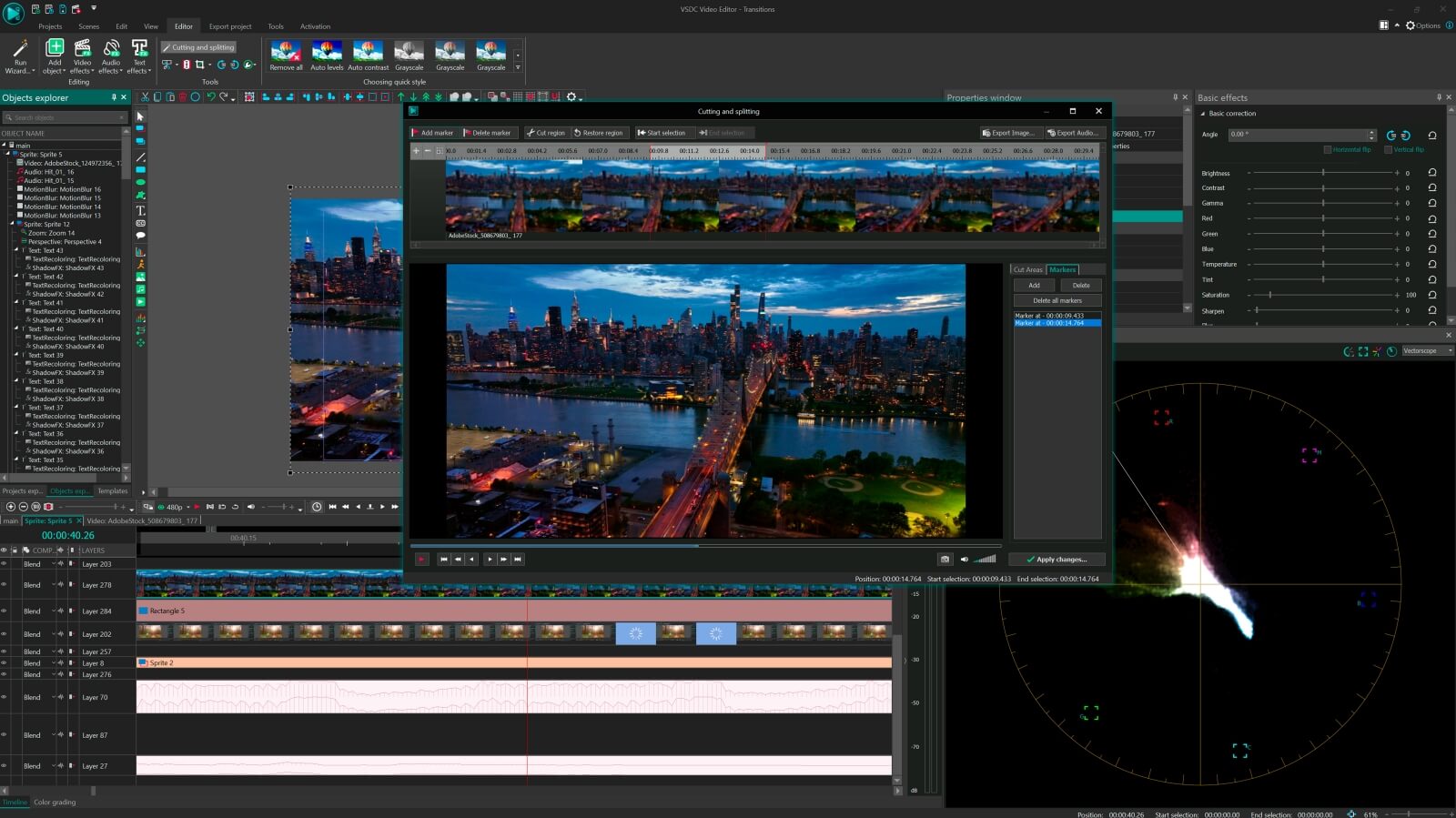
VSDC Free Video Editor is a good software for editing videos and creating videos of any complexity involving various visual and audio effects. The program offers rich functionality and yet has a simple and intuitive interface, allowing you to create videos with a bare minimum of efforts.
VSDC Free Video Editor enables you to rearrange your selected files, adjust their length and size until you are pleased with the outcome. You can also create new scenes and add them to your project, if you are not satisfied with the items you have added.
You can easily create videos for most popular multimedia devices, such as DVD players, iPod/iPhone/iPad, PSP, any smartphones and regular phones, Sony PlayStation, Xbox, Zune, Archos, iRiver, Creative Zen, Blackberry, MP4 players and many others.
VSDC Free Video Editor supports virtually all video, image and audio formats and codecs. so you won’t need any additional conversion tools to edit your files.
Pay attention during the installation process as you might need to decline some third-party offers.
Download VSDC Free Video Editor 2.2.4.324
Showing posts with label Media. Show all posts
Freemake Audio Converter 1.1.0.62
Freemake Audio Converter is a software that you can use to convert audio between multiple formats like MP3, WMA, WAV, FLAC, AAC, M4A, OGG. Convert WMA to MP3, MP3 to M4A, WAV to MP3, MP3 to WMA, FLAC to MP3, AAC to MP3, M4A to MP3, OGG to MP3, etc.
Use Freemake as Free MP3 Converter: convert audio to MP3 format for MP3 playes: iPod, Zune, Coby, SanDisc Sansa, iRiver, Walkman, Archos, GoGear, etc.
Convert audio to M4A format for Apple devices. Get smaller than MP3 audio files for playback on iPod, iPhone, iPad or in iTunes.
you can extract audio from video files, rename tracks, set the path to the temporary folder, change the interface language, merge files, and more.
Download Freemake Audio Converter 1.1.0.62
Use Freemake as Free MP3 Converter: convert audio to MP3 format for MP3 playes: iPod, Zune, Coby, SanDisc Sansa, iRiver, Walkman, Archos, GoGear, etc.
Convert audio to M4A format for Apple devices. Get smaller than MP3 audio files for playback on iPod, iPhone, iPad or in iTunes.
you can extract audio from video files, rename tracks, set the path to the temporary folder, change the interface language, merge files, and more.
Download Freemake Audio Converter 1.1.0.62
Free Audio Video Pack 2.2
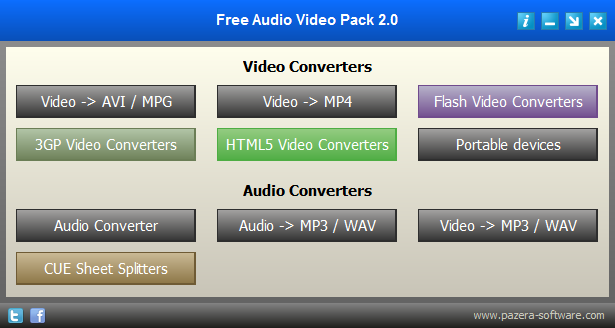
Free Audio Video Pack is a collection of portable audio and video converters which helps you to convert between all most popular audio and video formats like AVI, MP3, MP4, FLAC, MOV, WMV, WMA, FLV, 3GP, OGG and other.
Free Audio Video Pack is a collection of portable video and audio converters which helps you to convert between all most popular audio and video formats like AVI, MPG, MP4, MP3, WAV, FLAC, AAC, MOV, WebM, WMV, WMA, OGG, WebM, FLV, OGV, 3GP.
The package also includes applications that allows you to extract audio tracks from CD images based on the CUE sheets.
All converters have a very similar interface and they are simple to use, even for novice users.
To install, just extract archive FreeAudioVideoPack.7z to any folder on a hard disk or USB drive, then run FreeAudioVideoPack.exe file
Download Free Audio Video Pack 2.2
Free Audio Video Pack is a collection of portable video and audio converters which helps you to convert between all most popular audio and video formats like AVI, MPG, MP4, MP3, WAV, FLAC, AAC, MOV, WebM, WMV, WMA, OGG, WebM, FLV, OGV, 3GP.
The package also includes applications that allows you to extract audio tracks from CD images based on the CUE sheets.
All converters have a very similar interface and they are simple to use, even for novice users.
To install, just extract archive FreeAudioVideoPack.7z to any folder on a hard disk or USB drive, then run FreeAudioVideoPack.exe file
Download Free Audio Video Pack 2.2
K-Lite Codec Pack 10.5.5
K-Lite Codec Pack is a collection of codecs and related tools. Codecs are required to encode and/or decode (play) audio and video. The K-Lite Codec Pack is designed as a user-friendly solution for playing all your movie files.
With the K-Lite Codec Pack you should be able to play 99% of all the movies that you download from the internet.
The K-Lite Codec Pack has a couple of major advantages compared to other codec packs:
- It is always up-to-date with the latest versions of the codecs.
- It is very user-friendly and the installation is fully customizable, meaning that you can install only those components that you really want.
- It has been very well tested, so that the package doesn't contain any conflicting codecs.
- It is a very complete package, containing everything you need to play your movies.
There are four versions of the K-Lite Codec Pack: Basic, Standard, Full and Mega
K-Lite Codec Pack Basic contains only the most essential things. It contains everything you need to be able to play the most popular and widespread formats. It is small enough to fit on a single floppy. Also great for including on your movie CDs.
K-Lite Codec Pack Standard contains everything you need to play all the commonly used formats. This package should be enough for the average user.
K-Lite Codec Pack Full contains even more codecs. It also has encoding support for the various formats. This package is for power users and people who do their own encodings.
Download K-Lite Codec Pack 10.5.5
With the K-Lite Codec Pack you should be able to play 99% of all the movies that you download from the internet.
The K-Lite Codec Pack has a couple of major advantages compared to other codec packs:
- It is always up-to-date with the latest versions of the codecs.
- It is very user-friendly and the installation is fully customizable, meaning that you can install only those components that you really want.
- It has been very well tested, so that the package doesn't contain any conflicting codecs.
- It is a very complete package, containing everything you need to play your movies.
There are four versions of the K-Lite Codec Pack: Basic, Standard, Full and Mega
K-Lite Codec Pack Basic contains only the most essential things. It contains everything you need to be able to play the most popular and widespread formats. It is small enough to fit on a single floppy. Also great for including on your movie CDs.
K-Lite Codec Pack Standard contains everything you need to play all the commonly used formats. This package should be enough for the average user.
K-Lite Codec Pack Full contains even more codecs. It also has encoding support for the various formats. This package is for power users and people who do their own encodings.
Download K-Lite Codec Pack 10.5.5
Free Voice Recorder 1.0.0.0
Free Voice Recorder will help you to record sounds in the best sound quality, it is a program that is easy to use for people that have little experience with voice recording at all.
Recording your voice is an important feature to have with modern technology. Ever laptop comes with a built in microphone and voice recorder technology. However, getting the best voice recording software is a lot harder than that.
There are few voice recording programs that offer high quality sound files. The quality on most of the voice recording software is very poor due to the lack of attention to detail. Even the voice recorders that cost money can lack in quality most of the time. Therefore, it is a good idea to get a voice recorder that is high quality that will allow you to be proud to share what you are creating. Additionally, you will find this voice recorder to be extremely well priced compared to many others.
Download Free Voice Recorder 1.0.0.0
Recording your voice is an important feature to have with modern technology. Ever laptop comes with a built in microphone and voice recorder technology. However, getting the best voice recording software is a lot harder than that.
There are few voice recording programs that offer high quality sound files. The quality on most of the voice recording software is very poor due to the lack of attention to detail. Even the voice recorders that cost money can lack in quality most of the time. Therefore, it is a good idea to get a voice recorder that is high quality that will allow you to be proud to share what you are creating. Additionally, you will find this voice recorder to be extremely well priced compared to many others.
Download Free Voice Recorder 1.0.0.0
Nokia Software Recovery Tool 1.4.1
Nokia Software Recovery Tool is an advanced and easy to use application which can help you to reset and recover your phone software at home, if your phone is experiencing software related or software update problems.With Windows Phone 8 models, you can also use Nokia Software Recovery Tool to recover your phone in case your phone is not responding, it appears to be stuck, or it is not starting.
Nokia Software Recovery Tool features a very simple interface. After starting it, connect your device to the computer using the corresponding USB cable, and wait for the application to scan and read the phone's details, displaying them in the main window for you to see (make, model, IMEI, software version, etc)
Nokia Software Recovery Tool aims to offer you a method of repairing the regular software problems that your device can run into, by addressing the common issues faced by such phones. This way, you no longer need to resort to a technician to fix it, as you can take care of it at home, from in front of your PC.
Download Nokia Software Recovery Tool 1.4.1
Nokia Software Recovery Tool features a very simple interface. After starting it, connect your device to the computer using the corresponding USB cable, and wait for the application to scan and read the phone's details, displaying them in the main window for you to see (make, model, IMEI, software version, etc)
Nokia Software Recovery Tool aims to offer you a method of repairing the regular software problems that your device can run into, by addressing the common issues faced by such phones. This way, you no longer need to resort to a technician to fix it, as you can take care of it at home, from in front of your PC.
Download Nokia Software Recovery Tool 1.4.1
SketchUp Make 14.1.1282
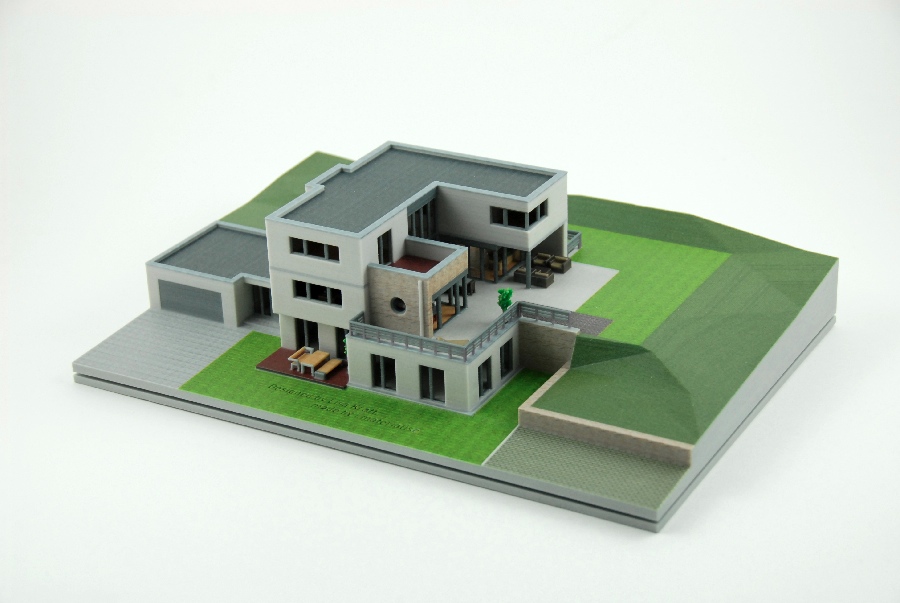
SketchUp is a 3D modeling program for applications such as architectural, interior design, civil and mechanical engineering, film, and video game design. A freeware version, SketchUp Make, and a paid version with additional functionality, SketchUp Pro, are available.
SketchUp is used by thousands of professionals in architecture, construction, engineering, commercial interiors, light construction, landscape architecture, kitchen & bath design, urban planning, game design, film & stage, woodworking, and plenty of other fields use SketchUp Pro all the time, every day. It’s the all-purpose antidote to complicated, expensive CAD software.
SketchUp is easy to use.there is an online Open source repository of free-of-charge model assemblies (e.g., windows, doors, automobiles, etc.), 3D Warehouse, to which users may contribute models.the program includes drawing layout functionality, allows surface rendering in variable "styles", supports third-party "plug-in" programs hosted on a site called Extension Warehouse to provide other capabilities (e.g., near photo-realistic rendering), and enables placement of its models within Google Earth.
SketchUp is like a pencil with superpowers. Start by drawing lines and shapes. Push and pull surfaces to turn them into 3D forms. Stretch, copy, rotate and paint to make anything you like. More advanced? Start modeling from CAD and terrain data, photographs or even hand sketches. Build models with custom behaviors and attributes. SketchUp Pro is as simple and as powerful as you want it to be.
SketchUp puts all of the help options in plain sight, which include video tutorials, tips and tricks, a blog, and a help center. It asks you to select a template from a long list that includes templates for architectural design, woodworking, Google Earth modeling, and basic plans. We started simple with the Beginning Training Template - Inches. The user interface is fairly basic in design, which is a good thing as some of these types of programs can be quite overwhelming. A toolbar at the top of the window includes the familiar menu options: Files, Edit, and View. There are also menu options to manage the Camera and Tools commands. A toolbox resides below with tools for creating and editing shapes, lines, and even adding building using Google Earth (you have to install the plug-in first). A helpful Instructor guided us through the setup process by creating simple lines going through each of the tools. In no time, we were creating shapes and designs, albeit very basic ones. The Tape Measure Tool let us measure our shapes, and the Eraser tool removed our mistakes.
Download SketchUp Make 14.1.1282
SketchUp is used by thousands of professionals in architecture, construction, engineering, commercial interiors, light construction, landscape architecture, kitchen & bath design, urban planning, game design, film & stage, woodworking, and plenty of other fields use SketchUp Pro all the time, every day. It’s the all-purpose antidote to complicated, expensive CAD software.
SketchUp is easy to use.there is an online Open source repository of free-of-charge model assemblies (e.g., windows, doors, automobiles, etc.), 3D Warehouse, to which users may contribute models.the program includes drawing layout functionality, allows surface rendering in variable "styles", supports third-party "plug-in" programs hosted on a site called Extension Warehouse to provide other capabilities (e.g., near photo-realistic rendering), and enables placement of its models within Google Earth.
SketchUp is like a pencil with superpowers. Start by drawing lines and shapes. Push and pull surfaces to turn them into 3D forms. Stretch, copy, rotate and paint to make anything you like. More advanced? Start modeling from CAD and terrain data, photographs or even hand sketches. Build models with custom behaviors and attributes. SketchUp Pro is as simple and as powerful as you want it to be.
SketchUp puts all of the help options in plain sight, which include video tutorials, tips and tricks, a blog, and a help center. It asks you to select a template from a long list that includes templates for architectural design, woodworking, Google Earth modeling, and basic plans. We started simple with the Beginning Training Template - Inches. The user interface is fairly basic in design, which is a good thing as some of these types of programs can be quite overwhelming. A toolbar at the top of the window includes the familiar menu options: Files, Edit, and View. There are also menu options to manage the Camera and Tools commands. A toolbox resides below with tools for creating and editing shapes, lines, and even adding building using Google Earth (you have to install the plug-in first). A helpful Instructor guided us through the setup process by creating simple lines going through each of the tools. In no time, we were creating shapes and designs, albeit very basic ones. The Tape Measure Tool let us measure our shapes, and the Eraser tool removed our mistakes.
Download SketchUp Make 14.1.1282
Labels:
Media,
Open Source,
Software
Music Collection 1.9.0.0
Music Collection is a free program that allows you manage your music collection in a database.when you start using it you can enter in a collection any kind of music media that you own or you intend to, and you can create as many as different collections wants.
The program creates the collection's database in a Microsoft Access format, so if you want later, you can use it, without the help of the program.
For every album the program saves all media contained, every medium tracks and the lyrics for every track. the album info can be manually entered or automatically via the Internet. After saving the albums, you can browse them, filter albums by all possible criteria and search for particular album tracks you are interested. Also the program can display and print all data from your music collection in different ways, so you can pick the desired one.
Music Collection presents all items contained in the album, in one page for an easy album overview. The details that are shown there are like album cover, album artists, notes, the tracks of each medium, the lyrics of each track and the duration of each one, as well as the total duration of the album.
Download Music Collection 1.9.0.0 Installer
Download Music Collection 1.9.0.0 Portable
The program creates the collection's database in a Microsoft Access format, so if you want later, you can use it, without the help of the program.
For every album the program saves all media contained, every medium tracks and the lyrics for every track. the album info can be manually entered or automatically via the Internet. After saving the albums, you can browse them, filter albums by all possible criteria and search for particular album tracks you are interested. Also the program can display and print all data from your music collection in different ways, so you can pick the desired one.
Music Collection presents all items contained in the album, in one page for an easy album overview. The details that are shown there are like album cover, album artists, notes, the tracks of each medium, the lyrics of each track and the duration of each one, as well as the total duration of the album.
Download Music Collection 1.9.0.0 Installer
Download Music Collection 1.9.0.0 Portable
MakeHuman 1.0.1
MakeHuman is a free, innovative and professional software to create realistic 3d humans for Illustrations, Animations, Games and Zbrush/Mudbox sculpting.
The features that make this software unique include a new, highly intuitive GUI and a high quality mesh, optimized to work in subdivision surface mode (for example, Zbrush). Using MakeHuman, a photorealistic character can be modeled in less than 2 minutes; MakeHuman is released under an Open Source Licence (GPL3.0) , and is available for Windows, Mac OS X and Linux.
The new GUI incorporates modelling controls based upon Ethnicity, Gender, Age, Muscle Tone and Body Mass. The full release will also provide features to enable you to model individual anatomical features using controls that are more standardised than they were in the 2007 release candidate. The full release will support the posing of figures.The export capabilities will be further expanded with the full release.
The view is also customizable and there are 2 quick buttons to bring the face closer or zoom out to a global view. The formats supported for exporting your work include OBJ, STL, MHX and DAE, which means that they can be loaded in other design software like Collada or Blender.
Download MakeHuman 1.0.1
The features that make this software unique include a new, highly intuitive GUI and a high quality mesh, optimized to work in subdivision surface mode (for example, Zbrush). Using MakeHuman, a photorealistic character can be modeled in less than 2 minutes; MakeHuman is released under an Open Source Licence (GPL3.0) , and is available for Windows, Mac OS X and Linux.
The new GUI incorporates modelling controls based upon Ethnicity, Gender, Age, Muscle Tone and Body Mass. The full release will also provide features to enable you to model individual anatomical features using controls that are more standardised than they were in the 2007 release candidate. The full release will support the posing of figures.The export capabilities will be further expanded with the full release.
The view is also customizable and there are 2 quick buttons to bring the face closer or zoom out to a global view. The formats supported for exporting your work include OBJ, STL, MHX and DAE, which means that they can be loaded in other design software like Collada or Blender.
Download MakeHuman 1.0.1
Labels:
Media,
Open Source,
Software
iTunes 11.2.2.3 for Windows
iTunes is more than an audio and video player, it lets you manage your iOS devices like iPod and iPhone as well as download content from the iTunes store.
With iTunes all your music, apps, and books you purchase automatically appear on all your devices. Or you can download only the stuff you want — including movies and TV shows — to just the devices you want.
The iTunes player keeps all your music, movies, and TV shows all in one place. Instead of going through stacks and stacks of CDs, you can import them into iTunes and quickly browse your whole collection. Organize it any way you want. Move it onto any of your devices. Play it whenever — and wherever — the mood strikes. Even have Genius make mixes of songs that go great together.
iTunes has lots of ways to help you find content you’ll love. Top Charts. The free Single or App of the Week. The shandpicked Movie and TV Show of the Week. New music recommendations based on your past purchases. And so much more.
iCloud makes iTunes even better, because your music, movies, TV shows, apps, books, and more live not just on your computer, but on all your other devices, too. Even music you haven’t purchased from iTunes can be stored in and played from iCloud, thanks to iTunes Match. So wherever you are, your favorite entertainment is always right there with you.
It’s easy to keep your iPod touch, iPod classic, iPod nano, and iPod shuffle ready to rock. Open iTunes, click Settings for your iPod, and choose a category like music or movies to see a list of what’s already there. To add something, click Add To, and your entire iTunes library appears next to the list of what’s on your iPod. Drag and drop. And you’re done.
Download iTunes 11.2.2.3 32Bit
Download iTunes 11.2.2.3 64Bit
With iTunes all your music, apps, and books you purchase automatically appear on all your devices. Or you can download only the stuff you want — including movies and TV shows — to just the devices you want.
The iTunes player keeps all your music, movies, and TV shows all in one place. Instead of going through stacks and stacks of CDs, you can import them into iTunes and quickly browse your whole collection. Organize it any way you want. Move it onto any of your devices. Play it whenever — and wherever — the mood strikes. Even have Genius make mixes of songs that go great together.
iTunes has lots of ways to help you find content you’ll love. Top Charts. The free Single or App of the Week. The shandpicked Movie and TV Show of the Week. New music recommendations based on your past purchases. And so much more.
iCloud makes iTunes even better, because your music, movies, TV shows, apps, books, and more live not just on your computer, but on all your other devices, too. Even music you haven’t purchased from iTunes can be stored in and played from iCloud, thanks to iTunes Match. So wherever you are, your favorite entertainment is always right there with you.
It’s easy to keep your iPod touch, iPod classic, iPod nano, and iPod shuffle ready to rock. Open iTunes, click Settings for your iPod, and choose a category like music or movies to see a list of what’s already there. To add something, click Add To, and your entire iTunes library appears next to the list of what’s on your iPod. Drag and drop. And you’re done.
Download iTunes 11.2.2.3 32Bit
Download iTunes 11.2.2.3 64Bit
Free Video to GIF 4.1.2
Free Video to GIF is a free powerful application to convert video files to GIF which can be integrated within webpages, used as avatar, screensaver for cell phone, cool element on website, or to be added to your signature in forum/email.
Free Video to GIF supports a wide variety of video formats like AVI, WMV, MPEG1/2, FLV, ASF, MP4, MOV, 3GP, MTS, MKV, VOB, etc. It also has useful clipping function and frame size customization. The interface has been desigend to be user-friendly and can be easily operated by anyone. The output GIF has good image quality.
A GIF or Graphics Interchange Format image is one of the graphics image formats that can be used to create animations. It supports a separate palette of 256 colors for each frame. However, Free Video to GIF can extract frames from video to make GIF with the highest image quality.
Free Video to GIF is a FREE program that can be used for any personal, educational or commercial purposes. It helps produce animated GIF from video easily like a Pro and offers more possibilities. Here you can download Free Video to GIF to make every file on your computer can be searchable.
Download Free Video to GIF 4.1.2
Free Video to GIF supports a wide variety of video formats like AVI, WMV, MPEG1/2, FLV, ASF, MP4, MOV, 3GP, MTS, MKV, VOB, etc. It also has useful clipping function and frame size customization. The interface has been desigend to be user-friendly and can be easily operated by anyone. The output GIF has good image quality.
A GIF or Graphics Interchange Format image is one of the graphics image formats that can be used to create animations. It supports a separate palette of 256 colors for each frame. However, Free Video to GIF can extract frames from video to make GIF with the highest image quality.
Free Video to GIF is a FREE program that can be used for any personal, educational or commercial purposes. It helps produce animated GIF from video easily like a Pro and offers more possibilities. Here you can download Free Video to GIF to make every file on your computer can be searchable.
Download Free Video to GIF 4.1.2
Any Video Recorder 1.0.4
Any Video Recorder is an easy to use software application which can help you capture streaming video like copy protected online video streams, TV shows, movies from online videotheques or Video on Demand services including Blockbuster, Hollywood Video, Hulu, Metacafe, Netflix, Dailymotion, Vimeo, Redbox and any other sites with high quality.
Any Video Recorder works like a video converter which remove DRM protection and convert videos to standard MP4 format.
It is capable of capturing protected iTunes rental or purchased movies and save them as MP4 , so you could play them back at a different time or enjoy on your mobile devices freely. It can aslo free record protected DVDs played on all kinds of video players like VLC, KMplayer, etc.
As a free screen recorder, Any Video Recorder supports capturing video, audio and images on your screen. Any part of the screen, any window on the screen, any webcam sessions, any games displayed on screen, and even the entire desktop can be recorded.
With this free video recorder, you do not even need a DRM remover, an iPhone, iPad, iMovie or whatever converter, since it could easily capture protected iTunes M4V rental or purchased movies, protected DVDs and HD videos played on video players and save them into MP4 format, which is extensively supported by Apple, Android devices or other portable devices.
Download Any Video Recorder 1.0.4
Any Video Recorder works like a video converter which remove DRM protection and convert videos to standard MP4 format.
It is capable of capturing protected iTunes rental or purchased movies and save them as MP4 , so you could play them back at a different time or enjoy on your mobile devices freely. It can aslo free record protected DVDs played on all kinds of video players like VLC, KMplayer, etc.
As a free screen recorder, Any Video Recorder supports capturing video, audio and images on your screen. Any part of the screen, any window on the screen, any webcam sessions, any games displayed on screen, and even the entire desktop can be recorded.
With this free video recorder, you do not even need a DRM remover, an iPhone, iPad, iMovie or whatever converter, since it could easily capture protected iTunes M4V rental or purchased movies, protected DVDs and HD videos played on video players and save them into MP4 format, which is extensively supported by Apple, Android devices or other portable devices.
Download Any Video Recorder 1.0.4
Appandora 2.0.0 iOS deivce manager
Appandora is a reliable free application and easy to use iOS deivce manager that can help you make iOS content management easier.
Appandora enables you to add or remove media from your player, as well as to create playlists, download applications or backup your files to a cloud location.
Appandora provides free application resources, from where you are able to get unlimited paid apps for free and simply install to your iPad/iPhone/iPod with just a few clicks. You’ll find apps in just about every category imaginable. Download apps for work, school, music, education, game or just plain fun. Appandora also functions on newer iDevices like the iPhone 5S, iPhone 5C, iPhone 5, iPad Air, iPad 4, iPod touch 5G.
With Appandora iPhone Music Transfer, you can backup all the audio files including music (*.MP3, *.M4A, *.WAV, *.AIFF), ringtone (*.M4R), audiobooks (*.M4B), TV Shows from iPod/iPhone/iPad to PC which iTunes does not allow you to do. You can also add local music files from your computer to iPod, iPhone or iPad, delete or export audio files from iPod/iPhone/iPad, add playlist on iPod/iPhone/iPad, and free transfer voice memos is also available. All the information about album, duration, artists, size will show on the center panel. Learn how to transfer music from iPod to PC freely.
Transfer iPhone/iPad/iPod camera roll and photo albums with Appandora for free. With this powerful and comprehensive iPad transfer, you can export camera roll from iPod/iPhone/iPad to your local computer as well as create a new album which enables you to delete or to export images, videos, transfer local images between iPod/iPhone/iPad and PC.
Download Appandora 2.0.0
Appandora enables you to add or remove media from your player, as well as to create playlists, download applications or backup your files to a cloud location.
Appandora provides free application resources, from where you are able to get unlimited paid apps for free and simply install to your iPad/iPhone/iPod with just a few clicks. You’ll find apps in just about every category imaginable. Download apps for work, school, music, education, game or just plain fun. Appandora also functions on newer iDevices like the iPhone 5S, iPhone 5C, iPhone 5, iPad Air, iPad 4, iPod touch 5G.
With Appandora iPhone Music Transfer, you can backup all the audio files including music (*.MP3, *.M4A, *.WAV, *.AIFF), ringtone (*.M4R), audiobooks (*.M4B), TV Shows from iPod/iPhone/iPad to PC which iTunes does not allow you to do. You can also add local music files from your computer to iPod, iPhone or iPad, delete or export audio files from iPod/iPhone/iPad, add playlist on iPod/iPhone/iPad, and free transfer voice memos is also available. All the information about album, duration, artists, size will show on the center panel. Learn how to transfer music from iPod to PC freely.
Transfer iPhone/iPad/iPod camera roll and photo albums with Appandora for free. With this powerful and comprehensive iPad transfer, you can export camera roll from iPod/iPhone/iPad to your local computer as well as create a new album which enables you to delete or to export images, videos, transfer local images between iPod/iPhone/iPad and PC.
Download Appandora 2.0.0
FotoSketcher 2.85
FotoSketcher is a free program which converts your digital photos into to pencil sketches with user-defined parameters.
FotoSketcher is a very easy to use application that provides a great amount of editing features ,you can improve your original photos with simple tools (enhance contrast, sharpen, simplify image, increase luminosity, color saturation etc…) and add simple or realistic frames and text .
you can select the drawing style from over 20 different styles are available, pencil sketches, watercolor, oil paintings, ink drawings and cartoons, from photo to painting (landscapes, architecture, portraits, etc.) in seconds .
Download FotoSketcher 2.85 Installer
Download FotoSketcher 2.85 Portable
FotoSketcher is a very easy to use application that provides a great amount of editing features ,you can improve your original photos with simple tools (enhance contrast, sharpen, simplify image, increase luminosity, color saturation etc…) and add simple or realistic frames and text .
you can select the drawing style from over 20 different styles are available, pencil sketches, watercolor, oil paintings, ink drawings and cartoons, from photo to painting (landscapes, architecture, portraits, etc.) in seconds .
Download FotoSketcher 2.85 Installer
Download FotoSketcher 2.85 Portable
Beauty Guide Lite 2.1.8
Beauty Guide Lite is a picture editor will help you to retouch skin; reduce wrinkles and eye puffiness; apply lipstick, rouge, eye shadow, and powder. You can do all of this right on the photo .
This beauty picture editor retouches face, corrects cosmetic defects and applies makeup directly on photos.
This program supports a lot of formats like JPG, TIFF, PNG, BMP and DIB, while it enables you to undo or redo actions, as well as zoom in and out of pictures, or display them in their actual size or how they fit best in the window.
The interface is easy to use and sports a clean design, which consists of a menu bar, a few buttons, a toolbar and a panel to display uploaded pictures. As a consequence, it is accessible to any type of user. In fact it also encompasses a large amount of demonstrations, so that you can easily learn how to use specific tools.
Download Beauty Guide Lite 2.1.8
This beauty picture editor retouches face, corrects cosmetic defects and applies makeup directly on photos.
This program supports a lot of formats like JPG, TIFF, PNG, BMP and DIB, while it enables you to undo or redo actions, as well as zoom in and out of pictures, or display them in their actual size or how they fit best in the window.
The interface is easy to use and sports a clean design, which consists of a menu bar, a few buttons, a toolbar and a panel to display uploaded pictures. As a consequence, it is accessible to any type of user. In fact it also encompasses a large amount of demonstrations, so that you can easily learn how to use specific tools.
Download Beauty Guide Lite 2.1.8
XMedia Recode 3.1.8.7
XMedia Recode is a good software designed to help you convert audio and video files.Using XMedia Recode application you will be able to convert DVD, AVI, MP4, 3GP, WMV, ASF, etc. Profiles for most devices like iPod, iPhone, Samsung, SonyEricsson, Zune, PSP, Blackberry, LG, etc. GUI for FFMPEG.
The application works with most formats targeting both beginners and experienced users with an innovative approach.At the same time, power users can step into the more advanced side and modify bitrate, keyframe interval, framerate, rate control mode and many other settings regarding both the video and audio chapters, using the other configuration tabs.
The application works with most formats out there and it also has an option to convert DVD and Blu-Ray discs into any format you like. But probably the ace up its sleeve is actually the way it manages to address novice user and more experienced ones at the same time.
As a conclusion, if you are looking for an app that's able to work with virtually all audio and video formats out there, XMedia Recode should be one of your top choices.
The program recognizes audio files (AAC, AC3, MP3, WAV, RA), video files (3GP, AVI, FLV, MP4, MPG, MPEG, MOV, WMV), AviSynth scripts (AVS), playlists (M3U, PLS, WPL), and it supports batch conversion.The output format can be customized according to the profile (e.g. custom, Apple, BlackBerry, HTC, Microsoft, Playstation 3, YouTube), file extension and format (e.g. 3GPP, ASF, AVI, FLAC, Matroska Video, MOV).
Download XMedia Recode 3.1.8.7 Installer
Download XMedia Recode 3.1.8.7 Portable
The application works with most formats targeting both beginners and experienced users with an innovative approach.At the same time, power users can step into the more advanced side and modify bitrate, keyframe interval, framerate, rate control mode and many other settings regarding both the video and audio chapters, using the other configuration tabs.
The application works with most formats out there and it also has an option to convert DVD and Blu-Ray discs into any format you like. But probably the ace up its sleeve is actually the way it manages to address novice user and more experienced ones at the same time.
As a conclusion, if you are looking for an app that's able to work with virtually all audio and video formats out there, XMedia Recode should be one of your top choices.
The program recognizes audio files (AAC, AC3, MP3, WAV, RA), video files (3GP, AVI, FLV, MP4, MPG, MPEG, MOV, WMV), AviSynth scripts (AVS), playlists (M3U, PLS, WPL), and it supports batch conversion.The output format can be customized according to the profile (e.g. custom, Apple, BlackBerry, HTC, Microsoft, Playstation 3, YouTube), file extension and format (e.g. 3GPP, ASF, AVI, FLAC, Matroska Video, MOV).
Download XMedia Recode 3.1.8.7 Installer
Download XMedia Recode 3.1.8.7 Portable
Adobe Flash Player 13.0.0.214
Adobe Flash Player is freeware software for viewing multimedia and streaming video on Youtube .
Flash Player works with most popular browsers , including Internet Explorer, Firefox, Google Chrome, Safari and Opera .
Flash Player can run from a web browser (as a browser plug-in) or on supported mobile devices, but there also exist versions running directly on an operating system intended both for regular users and content developers, denoted with the Projector (or Standalone) and Debugger name suffixes, respectively.
With Adobe Flash Player, you will be able to access streaming content of the highest quality and smoothly play HD videos right inside your browser's window.
Download Adobe Flash Player 13.0.0.214 for Internet Explorer
Download Adobe Flash Player 13.0.0.214 for Other Browsers
Flash Player works with most popular browsers , including Internet Explorer, Firefox, Google Chrome, Safari and Opera .
Flash Player can run from a web browser (as a browser plug-in) or on supported mobile devices, but there also exist versions running directly on an operating system intended both for regular users and content developers, denoted with the Projector (or Standalone) and Debugger name suffixes, respectively.
With Adobe Flash Player, you will be able to access streaming content of the highest quality and smoothly play HD videos right inside your browser's window.
Download Adobe Flash Player 13.0.0.214 for Internet Explorer
Download Adobe Flash Player 13.0.0.214 for Other Browsers
XBMC Media Center 13.0
XBMC Media Center is an award-winning free software media player and entertainment hub ,you can use to seamlessly play video clips and audio tracks, as well as view pictures .
It can be installed on Linux, OSX, Windows, iOS, and Android, featuring a 10-foot user interface for use with televisions and remote controls. It allows users to play and view most videos, music, podcasts, and other digital media files from local and network storage media and the internet.
XBMC can play all your music including mp3, flac, wav and wma formats. It has cue sheet, tag reading support and smart playlists for ultimate control of your music collection.
XBMC can do Movies too! Supporting all the main video formats including streamable online media .
XBMC can import, browse and play your Movie collection with ease.
The TVShows library supports episode and season views with posters or banners, watched tags, show descriptions and actors. Great for keeping track of your progress.
Import pictures into a library and browse the different views, start a slideshow, sort or filter them all using your remote control.
XBMC allows you to watch and record live TV all from the GUI interface. It works with a number of popular backends including MediaPortal, MythTV, NextPVR, Tvheadend and many more.
The real power of XBMC comes from the vast selection of user created Add-ons that are available though our repositories.
There are Add-Ons for popular web services, applications and scripts. See which ones are currently available: Add-ons
XBMC allows you to complete change the whole appearance of the GUI interface. Due to the highly customisable skinning engine you are almost able to change every aspect of it’s looks and feel. By utilising different colours, images and menu structures you can create a stunning interface that matches .
With UPnP compatibility you can stream to and from any other XBMC instances and play to other UPnP compatible devices in your home with ease. Have one UPnP master device and use other XBMC instances as clients which automatic keeps
you watched status and library up-to-date. You can also now import from uPnp sources to synchronize your data inside instances of XBMC.
Interact with XBMC using its JSON-RPC based remote interface. This brings loads of possibilities for remote controls, web browsers and 3rd party tools to take XBMC to the next level.
With support for hundreds of remote controls, CEC-compatible TVs, or one of the new Smartphone and Tablet Apps, XBMC allows you to control your media your way.
More
Download XBMC Media Center 13.0
It can be installed on Linux, OSX, Windows, iOS, and Android, featuring a 10-foot user interface for use with televisions and remote controls. It allows users to play and view most videos, music, podcasts, and other digital media files from local and network storage media and the internet.
XBMC can play all your music including mp3, flac, wav and wma formats. It has cue sheet, tag reading support and smart playlists for ultimate control of your music collection.
XBMC can do Movies too! Supporting all the main video formats including streamable online media .
XBMC can import, browse and play your Movie collection with ease.
The TVShows library supports episode and season views with posters or banners, watched tags, show descriptions and actors. Great for keeping track of your progress.
Import pictures into a library and browse the different views, start a slideshow, sort or filter them all using your remote control.
XBMC allows you to watch and record live TV all from the GUI interface. It works with a number of popular backends including MediaPortal, MythTV, NextPVR, Tvheadend and many more.
The real power of XBMC comes from the vast selection of user created Add-ons that are available though our repositories.
There are Add-Ons for popular web services, applications and scripts. See which ones are currently available: Add-ons
XBMC allows you to complete change the whole appearance of the GUI interface. Due to the highly customisable skinning engine you are almost able to change every aspect of it’s looks and feel. By utilising different colours, images and menu structures you can create a stunning interface that matches .
With UPnP compatibility you can stream to and from any other XBMC instances and play to other UPnP compatible devices in your home with ease. Have one UPnP master device and use other XBMC instances as clients which automatic keeps
you watched status and library up-to-date. You can also now import from uPnp sources to synchronize your data inside instances of XBMC.
Interact with XBMC using its JSON-RPC based remote interface. This brings loads of possibilities for remote controls, web browsers and 3rd party tools to take XBMC to the next level.
With support for hundreds of remote controls, CEC-compatible TVs, or one of the new Smartphone and Tablet Apps, XBMC allows you to control your media your way.
More
Download XBMC Media Center 13.0
Labels:
Media,
Open Source,
Software
Freemake Video Converter 4.0.3
Freemake Video Converter is a very good software that Converts videos to the most popular video formats like AVI, MP4, WMV, MKV, 3GP, DVD, MP3, iPad, iPhone, PSP, Android phones. Video to MP3 with one click! Rip & burn DVD. Convert YouTube to MP4, AVI, etc. with Freemake! Guaranteed result.
Optimize videos for Apple, Sony, and Android devices. Convert videos free to iPod Classic, Touch, Nano, iPod 5G, iPhone 1-5G, iPad 1-3G, Sony PSP, PS3, PS Vita, BlackBerry, Samsung, Nokia, Xbox, Apple TV, Android mobiles & tablets, etc.
Freemake is the only free video converter that rips online videos through direct URL copypaste from YouTube, Facebook, Vimeo, Dailymotion, LiveLeak, 50 more sites. Download YouTube to iTunes. Convert FLV to MP3 or any format. All supported sites.
Freemake is the only free video converter with integrated CUDA and DXVA technologies for the fastest ever video conversion and less CPU usage. The software automatically detects the optimal conversion parameters and switches on/off CUDA and DXVA for better conversion results.
Convert your movies to video Blu-ray format and burn high-quality BDs for free. Create Blu-ray discs out of any input content: video, audio, photos, URLs. Burn multiple Blu-ray copies and save the resulted Blu-ray video to HDD as an ISO image or Blu-ray folder.
Unlike other software, our free video converter doesn't have a two-hour limit and can burn DVD video up to 20h to a Standard DVD or 40h to DVD-DL. With our free video converter, you can make multiple DVD copies and save the output DVD video to your PC as an ISO image or DVD folder.
Convert DVD, MKV, MOV with embedded subtitles to any video format or device for free. Add SSA/SRT/ASS external subtitles to any video with our free video converter.
Download Freemake Video Converter 4.0.3
Optimize videos for Apple, Sony, and Android devices. Convert videos free to iPod Classic, Touch, Nano, iPod 5G, iPhone 1-5G, iPad 1-3G, Sony PSP, PS3, PS Vita, BlackBerry, Samsung, Nokia, Xbox, Apple TV, Android mobiles & tablets, etc.
Freemake is the only free video converter that rips online videos through direct URL copypaste from YouTube, Facebook, Vimeo, Dailymotion, LiveLeak, 50 more sites. Download YouTube to iTunes. Convert FLV to MP3 or any format. All supported sites.
Freemake is the only free video converter with integrated CUDA and DXVA technologies for the fastest ever video conversion and less CPU usage. The software automatically detects the optimal conversion parameters and switches on/off CUDA and DXVA for better conversion results.
Convert your movies to video Blu-ray format and burn high-quality BDs for free. Create Blu-ray discs out of any input content: video, audio, photos, URLs. Burn multiple Blu-ray copies and save the resulted Blu-ray video to HDD as an ISO image or Blu-ray folder.
Unlike other software, our free video converter doesn't have a two-hour limit and can burn DVD video up to 20h to a Standard DVD or 40h to DVD-DL. With our free video converter, you can make multiple DVD copies and save the output DVD video to your PC as an ISO image or DVD folder.
Convert DVD, MKV, MOV with embedded subtitles to any video format or device for free. Add SSA/SRT/ASS external subtitles to any video with our free video converter.
Download Freemake Video Converter 4.0.3
K-Lite Codec Pack Basic 10.0.0
K-Lite Codec Pack is a collection of codecs and related tools. Codecs are required to encode and/or decode (play) audio and video. The K-Lite Codec Pack is designed as a user-friendly solution for playing all your movie files.
With the K-Lite Codec Pack you should be able to play 99% of all the movies that you download from the internet.
The K-Lite Codec Pack has a couple of major advantages compared to other codec packs:
- It is always up-to-date with the latest versions of the codecs.
- It is very user-friendly and the installation is fully customizable, meaning that you can install only those components that you really want.
- It has been very well tested, so that the package doesn't contain any conflicting codecs.
- It is a very complete package, containing everything you need to play your movies.
There are three versions of the K-Lite Codec Pack: Basic, Standard and Full.
K-Lite Codec Pack Basic contains only the most essential things. It contains everything you need to be able to play the most popular and widespread formats. It is small enough to fit on a single floppy. Also great for including on your movie CDs.
K-Lite Codec Pack Standard contains everything you need to play all the commonly used formats. This package should be enough for the average user.
K-Lite Codec Pack Full contains even more codecs. It also has encoding support for the various formats. This package is for power users and people who do their own encodings.
Features of K-Lite Codec Pack 10 FULL version:
Player:
- Media Player Classic Home Cinema [version 1.6.5.6331]
DirectShow video decoding filters:
- ffdshow [version 1.3.4505]
- LAV Video [version 0.55.3-73]
- On2 VP7 [version 7.0.10.0]
DirectShow audio decoding filters:
- ffdshow [version 1.3.4505]
- LAV Audio [version 0.55.3-73]
- MONOGRAM AAC decoder [version 0.9.6.0]
DirectShow audio parsers:
- madFLAC [version 1.10]
- Monkey's Audio (DCoder) [version 1.0]
- OptimFROG (RadLight) [version 1.0.0.1]
- DC-Bass Source [version 1.4]
- AC3File [version 0.7b]
DirectShow source filters:
- Haali Media Splitter [version 1.11.288.0]
- LAV Splitter [version 0.55.3-73]
- AVI splitter (Gabest) [version 1.6.3.5565]
DirectShow subtitle filter:
- DirectVobSub (a.k.a. VSFilter) [version 2.41.5565.0]
Other filters:
- madVR [version 0.84.3]
- Haali Video Renderer [version 1.11.288.0]
Tools:
- Codec Tweak Tool [version 5.4.7]
- Win7DSFilterTweaker [version 5.5]
- MediaInfo Lite [version 0.7.61]
- VobSubStrip [version 0.11]
- GraphStudio [version 0.5.0.1]
Shell extensions:
- Icaros ThumbnailProvider [version 2.1.1]
- Icaros PropertyHandler [version 2.1.1]
Download K-Lite Codec Pack Basic 10.0.0
With the K-Lite Codec Pack you should be able to play 99% of all the movies that you download from the internet.
The K-Lite Codec Pack has a couple of major advantages compared to other codec packs:
- It is always up-to-date with the latest versions of the codecs.
- It is very user-friendly and the installation is fully customizable, meaning that you can install only those components that you really want.
- It has been very well tested, so that the package doesn't contain any conflicting codecs.
- It is a very complete package, containing everything you need to play your movies.
There are three versions of the K-Lite Codec Pack: Basic, Standard and Full.
K-Lite Codec Pack Basic contains only the most essential things. It contains everything you need to be able to play the most popular and widespread formats. It is small enough to fit on a single floppy. Also great for including on your movie CDs.
K-Lite Codec Pack Standard contains everything you need to play all the commonly used formats. This package should be enough for the average user.
K-Lite Codec Pack Full contains even more codecs. It also has encoding support for the various formats. This package is for power users and people who do their own encodings.
Features of K-Lite Codec Pack 10 FULL version:
Player:
- Media Player Classic Home Cinema [version 1.6.5.6331]
DirectShow video decoding filters:
- ffdshow [version 1.3.4505]
- LAV Video [version 0.55.3-73]
- On2 VP7 [version 7.0.10.0]
DirectShow audio decoding filters:
- ffdshow [version 1.3.4505]
- LAV Audio [version 0.55.3-73]
- MONOGRAM AAC decoder [version 0.9.6.0]
DirectShow audio parsers:
- madFLAC [version 1.10]
- Monkey's Audio (DCoder) [version 1.0]
- OptimFROG (RadLight) [version 1.0.0.1]
- DC-Bass Source [version 1.4]
- AC3File [version 0.7b]
DirectShow source filters:
- Haali Media Splitter [version 1.11.288.0]
- LAV Splitter [version 0.55.3-73]
- AVI splitter (Gabest) [version 1.6.3.5565]
DirectShow subtitle filter:
- DirectVobSub (a.k.a. VSFilter) [version 2.41.5565.0]
Other filters:
- madVR [version 0.84.3]
- Haali Video Renderer [version 1.11.288.0]
Tools:
- Codec Tweak Tool [version 5.4.7]
- Win7DSFilterTweaker [version 5.5]
- MediaInfo Lite [version 0.7.61]
- VobSubStrip [version 0.11]
- GraphStudio [version 0.5.0.1]
Shell extensions:
- Icaros ThumbnailProvider [version 2.1.1]
- Icaros PropertyHandler [version 2.1.1]
Download K-Lite Codec Pack Basic 10.0.0
Subscribe to:
Posts (Atom)