K-Lite Codec Pack Basic 10.0.0

K-Lite Codec Pack is a collection of codecs and related tools. Codecs are required to encode and/or decode (play) audio and video. The K-Lite Codec Pack is designed as a user-friendly solution for playing all your movie files.


With the K-Lite Codec Pack you should be able to play 99% of all the movies that you download from the internet.
The K-Lite Codec Pack has a couple of major advantages compared to other codec packs:
- It is always up-to-date with the latest versions of the codecs.
- It is very user-friendly and the installation is fully customizable, meaning that you can install only those components that you really want.
- It has been very well tested, so that the package doesn't contain any conflicting codecs.
- It is a very complete package, containing everything you need to play your movies.

There are three versions of the K-Lite Codec Pack: Basic, Standard and Full.
K-Lite Codec Pack Basic contains only the most essential things. It contains everything you need to be able to play the most popular and widespread formats. It is small enough to fit on a single floppy. Also great for including on your movie CDs.
K-Lite Codec Pack Standard contains everything you need to play all the commonly used formats. This package should be enough for the average user.
K-Lite Codec Pack Full contains even more codecs. It also has encoding support for the various formats. This package is for power users and people who do their own encodings.

Features of K-Lite Codec Pack 10 FULL version:

Player:
- Media Player Classic Home Cinema [version 1.6.5.6331]
DirectShow video decoding filters:
- ffdshow [version 1.3.4505]
- LAV Video [version 0.55.3-73]
- On2 VP7 [version 7.0.10.0]
DirectShow audio decoding filters:
- ffdshow [version 1.3.4505]
- LAV Audio [version 0.55.3-73]
- MONOGRAM AAC decoder [version 0.9.6.0]
DirectShow audio parsers:
- madFLAC [version 1.10]
- Monkey's Audio (DCoder) [version 1.0]
- OptimFROG (RadLight) [version 1.0.0.1]
- DC-Bass Source [version 1.4]
- AC3File [version 0.7b]
DirectShow source filters:
- Haali Media Splitter [version 1.11.288.0]
- LAV Splitter [version 0.55.3-73]
- AVI splitter (Gabest) [version 1.6.3.5565]
DirectShow subtitle filter:
- DirectVobSub (a.k.a. VSFilter) [version 2.41.5565.0]
Other filters:
- madVR [version 0.84.3]
- Haali Video Renderer [version 1.11.288.0]
Tools:
- Codec Tweak Tool [version 5.4.7]
- Win7DSFilterTweaker [version 5.5]
- MediaInfo Lite [version 0.7.61]
- VobSubStrip [version 0.11]
- GraphStudio [version 0.5.0.1]
Shell extensions:
- Icaros ThumbnailProvider [version 2.1.1]
- Icaros PropertyHandler [version 2.1.1]


Download K-Lite Codec Pack Basic 10.0.0

Norman Malware Cleaner 2.08.05

Norman Malware Cleaner is a Norman program utility that may be used to detect and remove specific malicious software (malware).
Note that it should not be used as a substitute for running normal proactive antivirus protection, but rather as a reactive tool to handle systems that are already infected.

Norman Malware Cleaner 2.07.06

Use this free and newly improved Malware Cleaner tool to scan and clean your computer from viruses, trojans and other types of malware. This simple and user friendly tool not only detects malicious software but also removes them from your computer. By downloading and running the program it will clean an infected system completely.
Malware Cleaner is a solution when your computer is already infected. Keeping safe requires a security
solution that protects your computer from malicious software. The easiest and most efficient way to protect your online
identity and your computer against these threats is an antivirus software or an all-in-one security solution. If you don’t
have one, your computer might be infected without you knowing about it.
Key Benefits & Features

Nothing to install and easy to run
Detect and Remove malware (viruses, Rootkit’s, FakeAV, worms and more)
Utilize advanced Anti-Rootkit technology
Quarantine module
Scanning and cleaning including Norman patented Norman SandBox technology
Supports Quick- Normal- Full- and Custom Scan mode
Command line function for better tailor scanning across several machines (businesses)
Daily signature updates available

Hardware Info - HWiNFO32 4.22.1970 32bit & 64bit

HWiNFO is one of the best software to know your PC specification and the details about every component of your system .


 It also comes with a wide range of system monitoring capabilities for temperature, fan speed, voltage and power. It even includes a sidebar gadget that you can enable to check out the status of the computer's RAM, CPU, GPU and more.
It doesn't require installation, you are able to quickly start using it, and the easy to navigate interface helps you get to the desired information in no time. For every component listed in the main window you can access a plethora of details.

This software comes with a useful pack of benchmarks you can use to test the performance of several components like the processor, physical memory and hard disk. In order to fully customize the running options of the application, you can access the 'Settings' area by choosing 'Configure' from the 'Program' menu.


Download HWiNFO32 4.22.1970    32 bit

Download HWiNFO64 4.22.1970    64 bit

Kaspersky Virus Removal Tool 11.0.0.1245 [11.08.2013]

Kaspersky Virus Removal Tool is a free program designed to be another virus scanner and detection software from Kaspersky. The produst will scan the specified locations for any virus threats and remove them or send to Quarantine folder. 


Kaspersky Virus Removal Tool does not provide resident protection for your computer. After disinfecting a computer, you are supposed to remove the tool and install a full version of antivirus software.


Features:

Simplified interface.
Can be installed to an infected computer (Safe Mode supported).
Composite scan and disinfection system: signature detection and heuristic analyzer.
Gathering system information and interactive creation of scripts for disinfection.
Automatic and manual removal of virus, Trojans and worms.
Automatic and manual removal of Spyware and Adware modules.
Automatic and manual removal of all types of rootkits.

 
Download Kaspersky Virus Removal Tool 11.0.0.1245 [11.08.2013]

Avira Free Antivirus 13.0.0.3885

Avira AntiVir Personal is a free comprehensive, easy to use antivirus program, designed to offer reliable free of charge virus protection to home-users, for personal use only.


It is constantly and rapidly scans your computer for malicious programs such as viruses,Trojans, backdoor programs, hoaxes, worms, dialers etc. Monitors every action executed by the user or the operating system and reacts promptly when a malicious program is detected.

Features:

AntiVir protection against viruses, worms and Trojans AntiDialer protection against expensive dialers
AntiRootkit protection against hidden rootkits
Faster Scanning up to 20% faster
AntiPhishing protection against phishing
AntiSpyware protection against spyware and adware NetbookSupport for laptops with low resolution
QuickRemoval eliminates viruses at the push of a button


Download Avira Free Antivirus 13.0.0.3885  Online Installer

Download Avira Free Antivirus 13.0.0.3885  Offline Installer

McAfee AVERT Stinger 11.0.0.466

Stinger is a standalone utility used to detect and remove specific viruses. It is not a substitute for full anti-virus protection, but rather a tool to assist administrators and users when dealing with an infected system.

McAfee AVERT Stinger

Stinger utilizes next-generation scan engine technology, including process scanning, digitally signed .DAT files, and scan performance optimizations.

It detects and removes threats identified under the "List Viruses" icon in the Stinger application.

Download : McAfee AVERT Stinger 11.0.0.466

Facebook Blocker 1.0

Facebook Blocker is a handy and reliable application designed to quickly Block or Unblock Facebook on your Windows system.

Facebook Blocker 1.0

Facebook Blocker 1.0

It is recommended for parents who want to block their childrens from Facebook, especially during exam times.and for employers who want to increase productivity by blocking Facebook during work hours.
It does not require any firewall or proxy server setup. All it takes you to just one click to block or unblock Facebook instantly.

Facebook Blocker is very easy to use tool with its cool GUI interface.
Here are the simple steps,

    Run 'Facebook Blocker' on your system as Administrator
    It will show you the current status of Facebook as seen in the screenshots below.
    Now you can just click on button below to Block or Unblock Facebook.
   

Note that some times, you may have to close and launch the applications (like Firefox, Chrome, IE etc) again for changes to take effect.


Download : Facebook Blocker 1.0

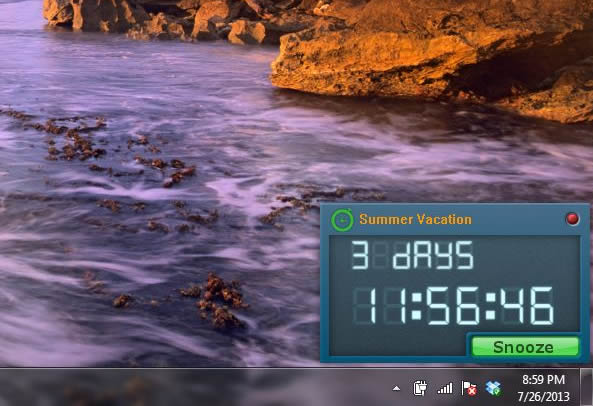
Free Countdown Timer 1.0.0

Free Countdown Timer is a handy and reliable software has been created to help people managing their time. It has a variety of uses. For example.


Free Countdown Timer

It can be very useful for those who find it hard to remember the dates for business meetings, appointments and interviews etc.

It can also help you in being reminded of an important event to come, and the time left for it to begin.

Use the software to start the countdown clock so that you can be reminded of the amount of time you are spending in front of the computer.

You can add the dates of the appointments or meetings so that you will not forget them.

The clock will display on the monitor of your computer and will not interfere with any other applications.


Download : Free Countdown Timer 1.0.0

ISpy 4.9.1.0

iSpy is an amazing software that provides surveillance, monitoring and alerts by using microphones and webcams to detect and record sounds and movement.


ISpy 4.9.1.0

Any media that is captured is compressed to flash video and available over the web or via the built in web server.

iSpy can run on multiple computers simultaneously and you can use the built-in webserver or our website to view captured media, live webcam feeds and control iSpy remotely. iSpy is free, open-source software, so if you want it to do anything else, please download the source code and customise it to your requirement.
 

 iSpy uses your webcams and microphones to detect and record movement or sound and provides security, surveillance, monitoring and alerting services. You can Control cameras with PTZ, one-click or auto upload to YouTube, auto FTP to any servers, Listen to and monitor audio live over the network, connect and monitor as many cameras and microphones as you like, import and export object lists to share with colleagues, connect multiple computers in a group and manage over the web.

iSpy is free but remote access and email alerts require a web services subscription.


Full Feature List
 

Embed the iSpy Viewer in your own website
Control PTZ enabled IP cameras
Talk out to Foscam, Axis and iSpyServer cameras
Text to speech - talk through the website via text to speech or dictation
Listen to and monitor remote microphones live over the network
Pair video and audio sources for capturing movies with sound
Upload to YouTube - auto upload captured content or one-click upload in the web view
Command line access (integrate with home automation)
Remote Commands (execute over the web or via mobile devices)
Desktop capturing
Access and control your cameras and microphones using your mobile device (iPhone, Android and Windows Phone 7)
Connect and monitor as many security cameras and microphones as you like.
Import and export object lists to share with colleagues.
Install iSpy Server and publish your webcam to other instances of iSpy, over your network and to the web
Detect, highlight, track and record movement
Record video and audio on demand (and via the web)
Detect loitering
Face detection alert mode (*NEW)
Connect multiple computers in a group and manage over the web
Customise movement detection areas on your cameras
Detect and record sound
FTP frames from your camera to a remote server
Save frames from your camera to a local directory and browse them through ispyconnect
Send an email or SMS/ MMS/ Twitter alert when movement or sound is detected
Send an email or SMS alert when movement or sound is not detected (monitor machinery or staff activity)*
Receive email movement alerts with attached frame grab images from your webcams
Periodically receive image grabs via email from your webcams
Connect to any device, even webcams attached to other computers with JPEG, MJPEG, IP Cam, webcam and AVI file support
Watch live and recorded media over the web (through this website and over your local network) and also via mobile devices (iphone/ android/ windows phone 7)
Access and control iSpy remotely
Password protect iSpy and hide it in the System Tray
Schedule sound and video capturing to start and stop automatically
Time-lapse record from any camera
 Motion track and count moving objects
 Add an unlimited number of floor plans
 View floor plans online with realtime movement/ sound alerts
 Automatic license plate recognition (ALPR, CPR, LPR or LAPI)

HSL (Colour filtering) on Motion Detection - for fire/smoke/thermal imaging and tree/ shadow removal
PTZ auto tracking moving objects
Integration with MediaPortal - view and control your ispy servers with HTPCs
Connect multiple instances of iSpy and iSpy server running on different computers to this website and view all aggregated media online

Download :  ISpy 4.9.1.0

RGS-AvaCam 3.6.1

AvaCam is a program that will allow you to view the images taken by any of your video devices. Should you have a webcam or any video capture device connected to your computer, this program will allow you not only to view what that device is capturing live, but also to record and save videos or pictures.


You can configure several settings in order to adjust the final quality of the video or the snapshot to meet your needs. These settings include video resolution, image mirror, image flip, low light, brightness, contrast, gamma, and hue. The program is even capable of performing “face tracking”. AvaCam is free for non-commercial use.

 AvaCam is able to capture pictures at any interval (time-lapse), or whenever it detects motion. There is an jpg-to-avi (bmp-to-avi) converter included to make video's from your snapshots! The motion dectect feature makes it ideal to use as a surveillance system. You can also take snapshots manually, either one by one or using the burst mode, which will take multiple photos in a quick sequence.

This program can save videos as .AVI files, using any compression method. AvaCam has a built-in Viewer that can be used to select the pictures you would like to edit, launching your preferred graphics editor.

Automatically save pictures on any interval, motion detection, burst mode, view, print, copy and edit your snapshots and view the video full screen! Resize the video source to any size you want (also full screen).
Possible to save images using motion detection! Record video and save them as AVI-files (using any compression available) to your hard disk.

Remote Monitoring possible via LAN, Internet, wherever

Features:

    Intuitive and modern user interface
    Easy to use
    Can be used with ANY type of video device (not just webcams)
    View multiple Cam's/video devices
    Motion detection feature: allows you to save an image automatically when movement is detected
    AutoSave feature (time-lapse): allows you to save a snapshot every xxx-seconds
    Includes an avi creator build-in wizard which allows you to create AVI video files from jpg's or bmp's!!
    Stretch and/or fit the video to the screen resolution
    Full screen video!
    Build-in viewer/editor/player/browser
    One-click photographical effects to improve the image
    Take a snapshot of the videostream and save it as JPG, JPEG or BMP formats
    Burst mode
    Record video as AVI-file to disk with any available compression
    Save JPG's with user selectable compression quality
    Print your snapshot's
    Print preview
    Remote Monitoring (via Lan, Internet etc)
    Define your own favorite viewer or paintprogram
    Activate and de-activate AvaCam's AutoSave or Motion Detection features at designated times
    Run multiple copies of AvaCam which can be configured separately
    IrfanView support
    Embed date and time into the saved snapshots!
    Record video on motion

Download : RGS-AvaCam 3.6.1